Design. Compare. Generate. Your way.
A modern database modeling tool for creating and maintaining complex systems.
Built for experienced engineers who already know why structure and consistency matter.
You build your product. OrmFactory gives you the tools to manage its data model.
Model-first. Version-controlled.
What is Model-First?
Model-first puts your data model at the center of development. You design the model explicitly, keep it under version control, and use it as the source of truth for generating application code and bringing databases in line with it.
Features
- standalone desktop app with no cloud dependencies
- native x64/arm64 builds for Windows, macOS, and Linux
- lightweight, fast, and memory-efficient
- supports multiple databases: MySQL, PostgreSQL, SQL Server and Oracle (via O-Bridge)
No analytics. No tracking. No telemetry.
Start using OrmFactory for free.
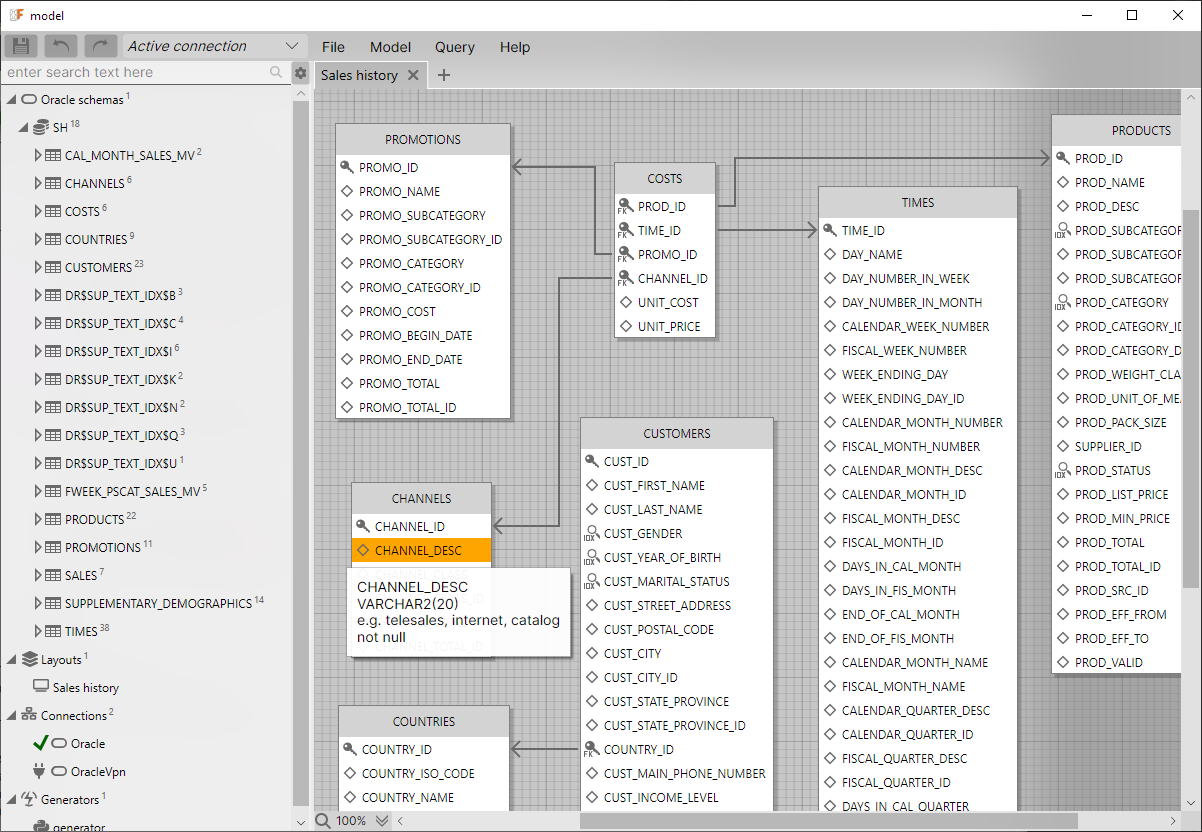
Work with your database model, application code, and data in one place. Explore your schema, generate code, compare changes with a live database, and inspect or edit data without switching between tools.
You decide what changes to make, what code to generate, and when to apply structural changes to a database.
Why Model-First
OrmFactory puts the database model at the center of development. The model becomes the source of truth for database structure, lives alongside your code in version control, and evolves as your project changes.
You can edit it without connecting to a database, generate application code from it, compare it with a live database, and choose which changes to apply in either direction.
This approach adds one responsibility: you need to maintain the model alongside your code. In return, database structure becomes an explicit part of your development workflow, rather than something that exists only in each environment.
Workflow
OrmFactory uses a single database model to connect database structure, application code, and documentation.
Start with a new model or import an existing database. From there, edit and version the model, compare it with a live database, deploy structural changes, or generate code and documentation.
The model stays under your control. You choose what to change, what to generate, and when to apply changes to a database.
1. Design the model first
Keep your database model at the center of development. When requirements change or an idea needs testing, update the model and apply the schema changes to your local database.
Press F5 to regenerate your application code. Alt-Tab back to your IDE and test the changes in real code. If the design doesn't work, adjust the model and try again.
Short feedback loops keep you focused on the problem, not on the process. Refine the data model while the idea is still fresh in your mind, instead of trying to get everything right on the first attempt.
Your model remains the source of truth, evolving alongside your application.
2. Generate application code
OrmFactory's generator system lets you generate code in different languages and styles, using your preferred approaches, ORMs, and databases. You can also write your own generators to fit your processes, workflows, and preferences.
Generator metadata allows you to control how tables, columns, and foreign keys are represented in generated code. Override names, ignore elements, and pass additional hints to any generator. Partial generation allows you to select tables, schemas, databases and layouts for each generator.
You can also use Named Rows to embed key table data into generated code, creating constants or object references to avoid magic numbers.
See working examples: Entity Framework, Dapper, Hibernate, JOOQ, Django.
3. Apply model changes to your database
When your model changes, choose how to apply them to a database.
- Synchronize in the GUI. Compare the model and database, review the differences, and synchronize in either direction.
- Deploy from the GUI. Compare the model with the target database, review the generated DDL, and apply the structural changes.
- Deploy through CI/CD. Use the OrmFactory CLI to check the model against a target database and deploy changes as part of your pipeline.
For ORM-based workflows, you can also generate application code and use your ORM's own migration mechanism. For multi-stage delivery, use the same versioned model as the input for each environment, with deployment controlled by your pipeline.
4. Work with data
Once your application is running, inspect and edit its data without switching to another database tool.
OrmFactory lets you query tables, follow foreign-key references, and edit records directly. Streaming fetch displays rows as they arrive, so you can start inspecting results without waiting for the entire result set to load.
Keep the feedback loop short: build a feature, check what it actually stored, adjust the data or model, and continue developing.
5. Keep the model in sync
Database changes don't always originate in OrmFactory. A teammate may change the schema, an ORM migration may run, or someone may execute SQL directly.
Compare the model with the actual database and review the differences in a single tree. Choose which side is the source of truth for each change: bring selected database changes into the model, or generate DDL from the model to bring the database in line.
You stay in control of what gets synchronized in either direction. Review the resulting DDL before applying database changes, and keep your model up to date as the database evolves.
6. Automate database deployment with CI/CD
Keep your database model in Git and integrate OrmFactory into your CI/CD pipeline.
Before a change is merged, ormfactory check compares the model with the target database and generates a report without modifying the database. Review the planned changes and resolve any operations that require explicit confirmation.
Once your pipeline's approval requirements are met, ormfactory deploy validates the changes again and applies them to the target database. Each invocation targets one database, so you can define separate stages and approval rules for development, staging, and production.
Migration hints can be versioned alongside the model, preserving decisions such as table renames and intentional drops across environments.
Sync with any environment
Connection Profiles map each database in your project to a connection. Switch profiles to change the connections used across the entire project, making it easy to work with development, testing, and production environments.
You can also leave individual databases offline by assigning them an empty connection. This lets you work on their models without applying schema changes to a live database.
Learn more about Connection Profiles and model synchronization.
Git-friendly model storage
OrmFactory supports two project formats to fit different workflows.
The single-file XML format is convenient for solo development and for sharing a model with colleagues. The project directory format stores databases, tables, layouts, connections, and generators in separate files, making it better suited for version control and team development.
OrmFactory uses Git-friendly XML serialization in both formats, keeping attributes on separate lines to make changes easier to review. In the directory format, separate files also help reduce merge conflicts when developers make parallel changes to different parts of the model.
After merging, synchronize or deploy the updated model to apply the changes to your databases.
Learn more about the project file format.
Like any good editor, OrmFactory supports undo and redo. But we still recommend Git.
Interactive Database Diagrams
A visual layout is more than a picture of your database schema. Arrange tables to match the way you work, keep related structures close together, and use the diagram to navigate your model. Layouts support both foreign keys defined in the database and virtual foreign keys defined in the model, letting you visualize relationships even when the database doesn't enforce them. The layout context menu lets you inspect table definitions, fetch data, and work with database objects directly from the layout.
OrmFactory supports complex schemas with hundreds of tables and dense foreign-key relationships. Connections are rerouted continuously as you move tables around the canvas, keeping diagram editing responsive even with complex layouts.
Export layouts from the desktop app to PNG, WebP, or SVG. OrmFactory also supports command-line execution, so you can generate interactive SVG diagrams with hover highlighting, clickable links, and customizable rendering.
Use these diagrams in project documentation, internal wikis, and architecture reviews.
Integrate SVG export into your GitLab CI/CD pipeline to publish updated diagrams automatically whenever model changes are pushed. Once configured, this keeps documentation in sync without a separate manual diagram-maintenance step.
Learn more about diagram export
Built-in data editor with smart query tools
You can view and edit data directly within OrmFactory. The query window includes autocomplete based on your model, making it easier to write complex queries. The foreign key tooltip feature allows you to quickly inspect referenced objects without adding joins to your queries.
Instead of loading the entire result set before displaying it, OrmFactory uses streaming fetch. Rows appear immediately as they are received from the database, while the grid automatically follows the incoming data stream until the query completes.
You don't need to paginate through the result set just to reach the newest rows. As loading progresses, the grid follows the incoming data and ends up at the newest rows when the query completes. These are often the records developers want to inspect.
Other data management features:
- A fast data grid capable of smoothly scrolling through millions of rows.
- Low memory consumption. Optimized to handle millions of rows with minimal RAM usage.
- A multiline editor with XML and JSON syntax highlighting.
- Prettify-on-the-fly feature for minified JSON.
Multi-Database support
A single project can contain multiple independent databases, each with its own schemas, tables, and connection. This is useful for microservices, legacy integrations, or gradual migrations where several database structures need to be maintained together.
Connection Profiles let each database use a different connection depending on the environment, or remain offline when no connection is assigned.